

Hub
Hub holds everything AI in helmstudio: the Assistant you chat with, and the AI work pipelines do without a chat. It is in the rail after Models, for admins only. Anyone else does not see it.
It has four tabs: Assistant, In pipelines, Providers and Plugins. Above them, every tab shows the Assistant’s state (On, Off or Not set up) and the Assistant on switch, which turns the Assistant on or off for everyone.
Assistant
Section titled “Assistant”Everything about the Assistant, set here for everyone.
Set it up
Section titled “Set it up”Until the Assistant is set up, this tab opens straight on the setup form. It is one flow:
- Who answers: pick a card, such as Your Claude subscription, DeepSeek, Anthropic, OpenAI, a Local server (Ollama or LM Studio) or a provider already saved in Providers. Remote ones are greyed while the deployment’s remote switch is off.
- Key: for a remote provider, paste its API key. It is checked with the provider, saved on the server and never shown again. A saved provider or a local server needs none.
- Model: pick one of its models, then save.
When it is saved, the Assistant is on and its drawer opens. To change it later, press Change in Model.
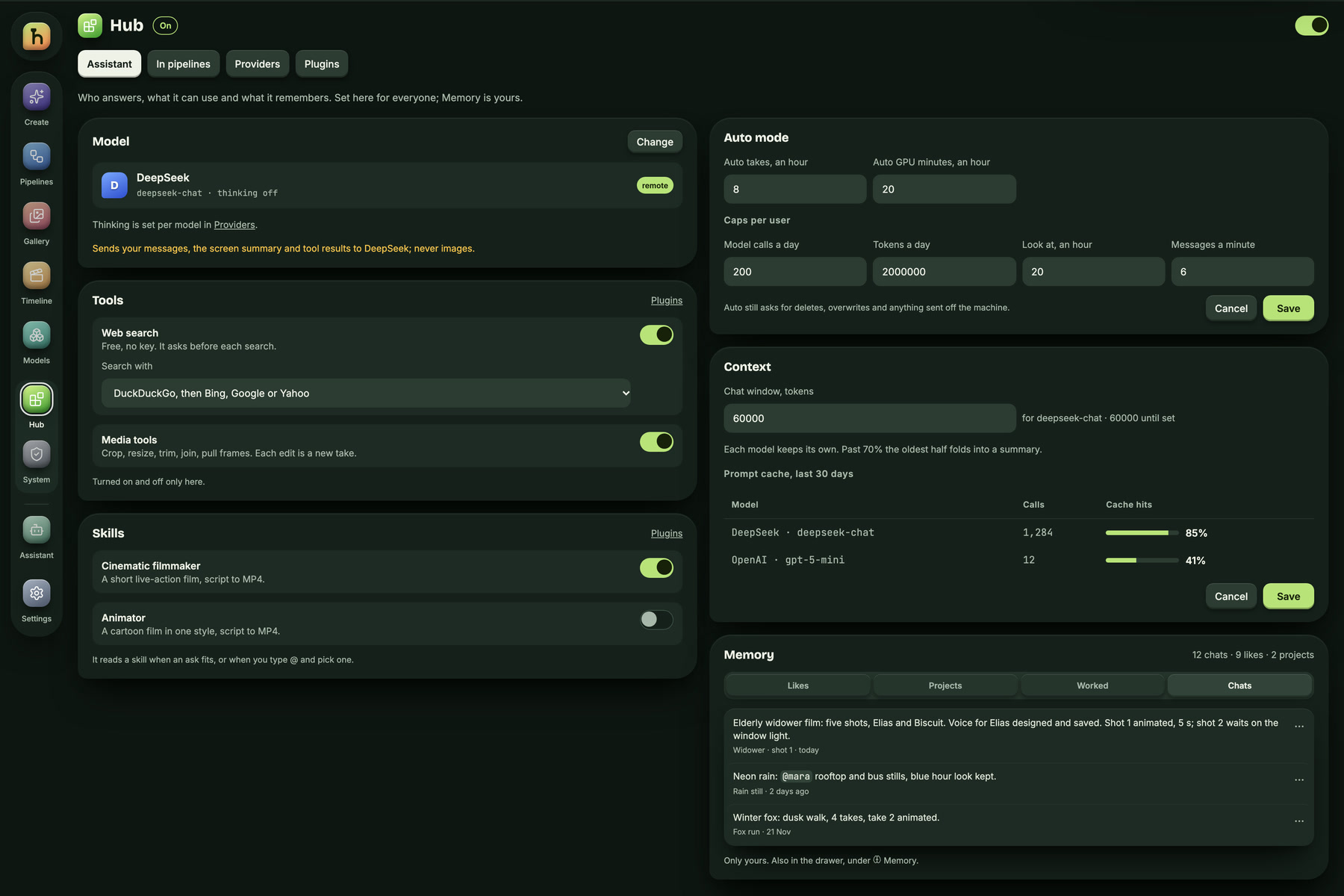
What you can set
Section titled “What you can set”| Section | What it holds |
|---|---|
| Model | Who answers and which model, with what it sends out. Thinking is set per model in Providers. |
| Tools | The Assistant tools from plugins, such as Web search and Media tools, each with its on/off switch. For Web search, Search with picks the free search or a search provider from Providers. |
| Skills | The skills from plugins, each with its on/off switch. |
| Auto mode | The caps per user (see below). |
| Context | Chat window, tokens for the chosen model, and Prompt cache, last 30 days. |
| Memory | Your own memory: only yours, the same list as in the drawer. |
Tools and skills are turned on and off only here. The Plugins tab adds and removes them.
Chat window, tokens is the model’s real limit (60000 until set; each model keeps its own). Past 70% the oldest half of a chat folds once into a short summary, so plans and decisions stay. A smaller window costs less per answer.
Prompt cache lists each model with its Calls and Cache hits: the share of prompt tokens the provider read from its cache. Hits cost less. See How it keeps long chats.
Caps per user
Section titled “Caps per user”| Cap | What it limits |
|---|---|
| Auto takes, an hour | Takes Auto mode may start without asking (default 8). |
| Auto GPU minutes, an hour | GPU minutes Auto mode may use without asking (default 30). |
| Model calls a day | Calls to the Assistant’s model. |
| Tokens a day | Tokens the Assistant’s model uses. |
| Look at, an hour | Takes it may look at with Look at. |
| Messages a minute | Messages a user sends. |
In pipelines
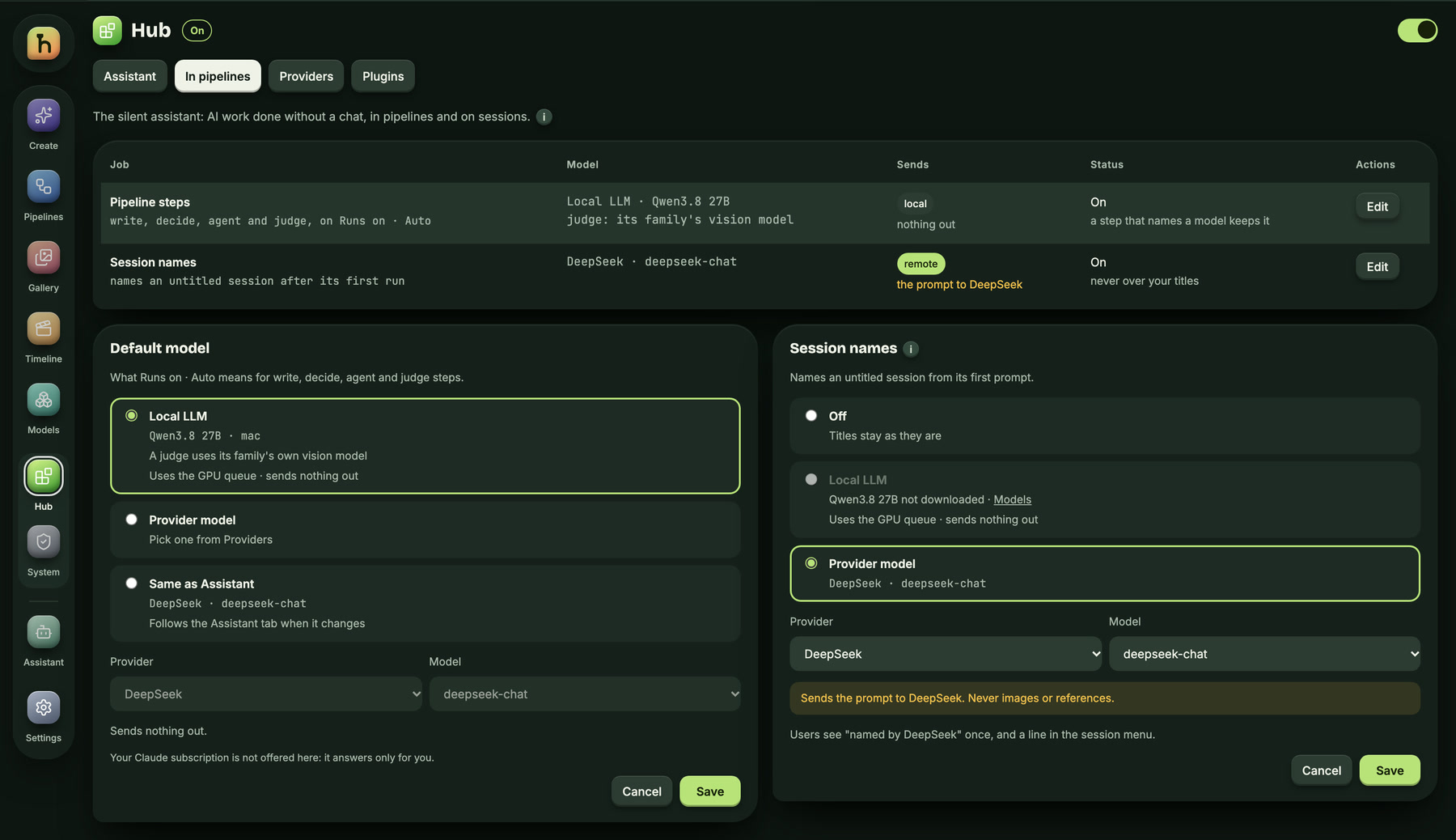
Section titled “In pipelines”The AI work done without a chat: a pipeline’s write, decide, agent and judge steps, and naming sessions. A table lists each job, its model, what it sends and its status. Press Edit on a row to change it.
Default model
Section titled “Default model”The model a pipeline’s write, decide or agent step uses when its Runs on is Auto:
- Local LLM: Qwen3.8 27B on your own hosts. It uses the GPU queue and sends nothing out. This is the default.
- Provider model: a model from Providers shared with everyone. A remote one sends the step’s text out; Submit lists it in what leaves the machine.
- Same as Assistant: follows the Assistant’s model when it changes.
A step that names its own model keeps it. A judge on Auto always keeps its family’s vision model, since it looks at thumbnails. If the chosen default can no longer be used (disabled, deleted, or remote models turned off), Auto falls back to the Local LLM. Your Claude subscription is never offered here, as pipelines run for every account.
Session names
Section titled “Session names”Who names a new session from its first prompt:
- Off: titles stay as they are.
- Local LLM: Qwen3.8 27B on your own hosts. It uses the GPU queue and sends nothing out. Greyed while no host has it.
- Provider model: an enabled model provider. A remote one sends the prompt out.
Providers
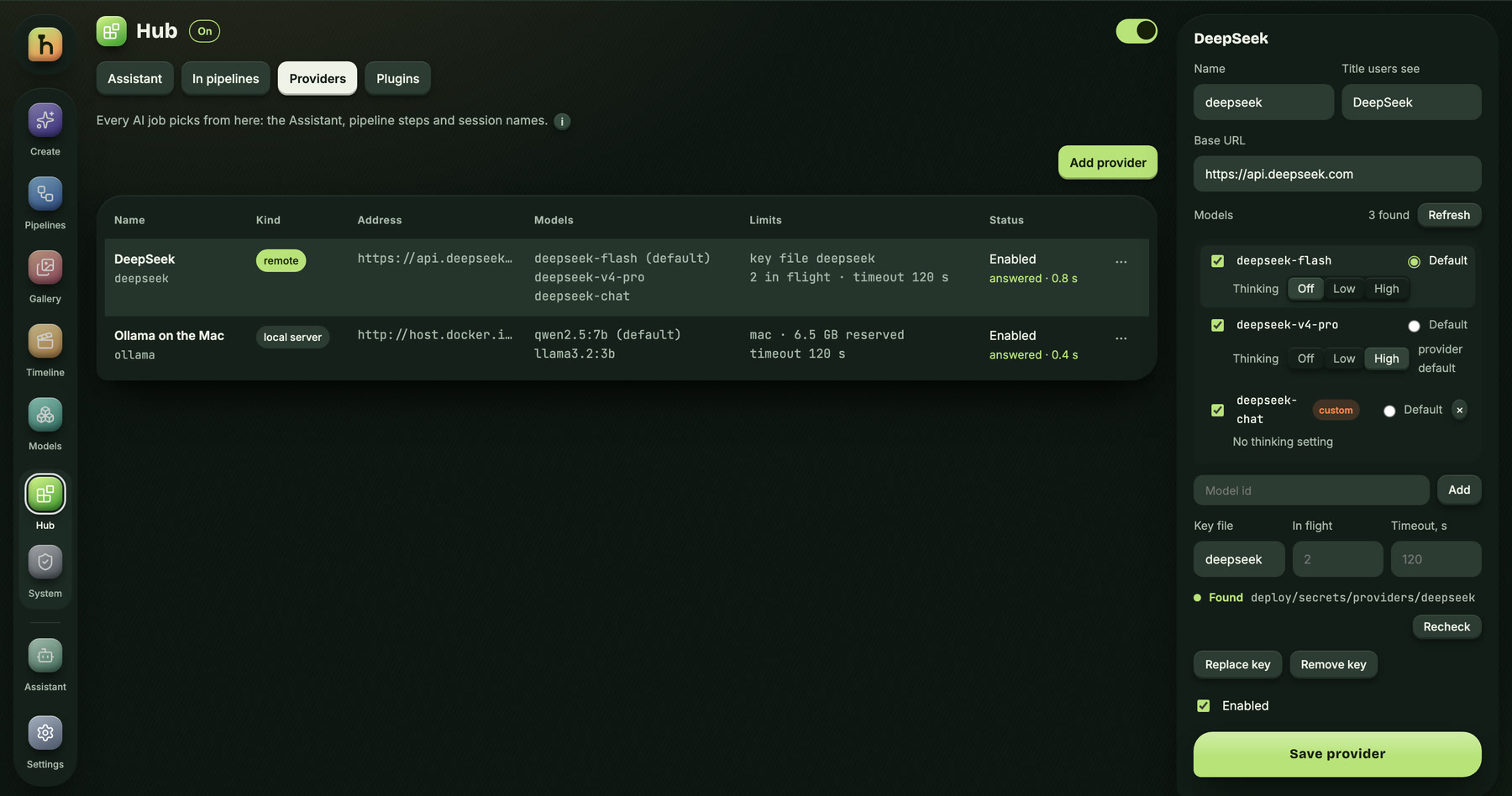
Section titled “Providers”Model providers are the text models that power the Assistant, pipeline AI steps and session names. They never make images, video or sound; those always run on your own hosts.
There are two kinds:
- Local server: any OpenAI-compatible server you run on a local or private address, such as Ollama, LM Studio or llama-server. Set the GPU host it runs on and its Memory, GB; that host keeps the memory reserved.
- Remote: a hosted provider over https: DeepSeek, OpenAI, Anthropic, Google Gemini, OpenRouter, Groq or Mistral. Remote providers work only while the deployment’s remote switch is on.
Add a provider
Section titled “Add a provider”The form sits beside the table. Add provider empties it.
- Pick a Preset. It fills the form; every field stays editable.
- Set the Title users see, and check the Base URL.
- For a remote provider, paste the key under API key and press Save key. The key is checked with the provider, saved in a file on the server, and never shown again.
- The models load from the provider. Tick the ones to use (up to 16), mark one as Default, and set each one’s Thinking level (Off, On, Low, Medium or High, where the model offers them). Some models always think.
- Save.
If the provider does not list a model, type its Model id and press Add. Refresh asks the provider again.
Manage a provider
Section titled “Manage a provider”- Once a key is found, Replace key swaps it (the old key stays until the new one is saved) and Remove key deletes it.
- Each row’s ⋯ menu has Test, Edit, Enable or Disable, and Delete….
Plugins
Section titled “Plugins”The plugins helmstudio has found, with Rescan, Add plugin and Remove. There is no on/off switch for tools and skills here: their rows say Turned on in Hub › Assistant. See Plugins.