

The Mac app
The app runs the whole studio on one Mac: the services in a small VM of their own, the model runners on the Mac’s
GPU, and the studio in one window. It brings its own VM and Docker tools, so you need neither Docker nor OrbStack,
and it does not touch a Docker you already have. It can run beside the local and production stacks, on its own
port: the studio is at http://127.0.0.1:8310.
Requirements
Section titled “Requirements”- A Mac with Apple Silicon, macOS 13 or later, and about 6 GB of free disk (plus your models).
- The internet, for the first open only. The app fetches the VM’s system disk (about 320 MB), the images (a 0.6 GB download, 2.5 GB on disk) and the runners’ Python packages (about 2 GB).
Install
Section titled “Install”-
Download
helmstudio-0.1.0-alpha.5.dmgfrom the GitHub releases. To check it, compareshasum -a 256 helmstudio-0.1.0-alpha.5.dmgwith the release’sSHA256SUMS. -
Open it and drag helmstudio to Applications.
-
The app is ad-hoc signed: the first time, right-click it › Open, then Open again.
First open
Section titled “First open”-
Open helmstudio from Applications.
-
A list of steps runs: Check this Mac, Start the VM, Download the images, Make the secrets, Set up the runners, Start. It takes about 5 minutes on a Mac that has never fetched them. The images step labels both sizes, for example 0.4 of 0.6 GB download · 2.5 GB on disk.
-
Set the admin account: an email and a password of 12 characters or more, with no quote. This is your sign-in to the studio. It is kept only in the app’s folder.
-
Choose the models folder. The default is
~/helmstudio-models; Choose… picks an existing folder. -
The studio window opens. Sign in with the admin account.
If a step fails, the screen says which one. Show log opens its log; Try again goes on from that step.
Every later open shows the start screen for about a minute (VM, services, runners), then the studio.
The window itself never scrolls; only the panels inside it do.
Updates
Section titled “Updates”From 0.1.0-alpha.2 the app updates itself: on 0.1.0-alpha.2 to 0.1.0-alpha.4, choose Check for updates… to get
0.1.0-alpha.5. An older app has no updater: download the new .dmg and replace it by hand once.
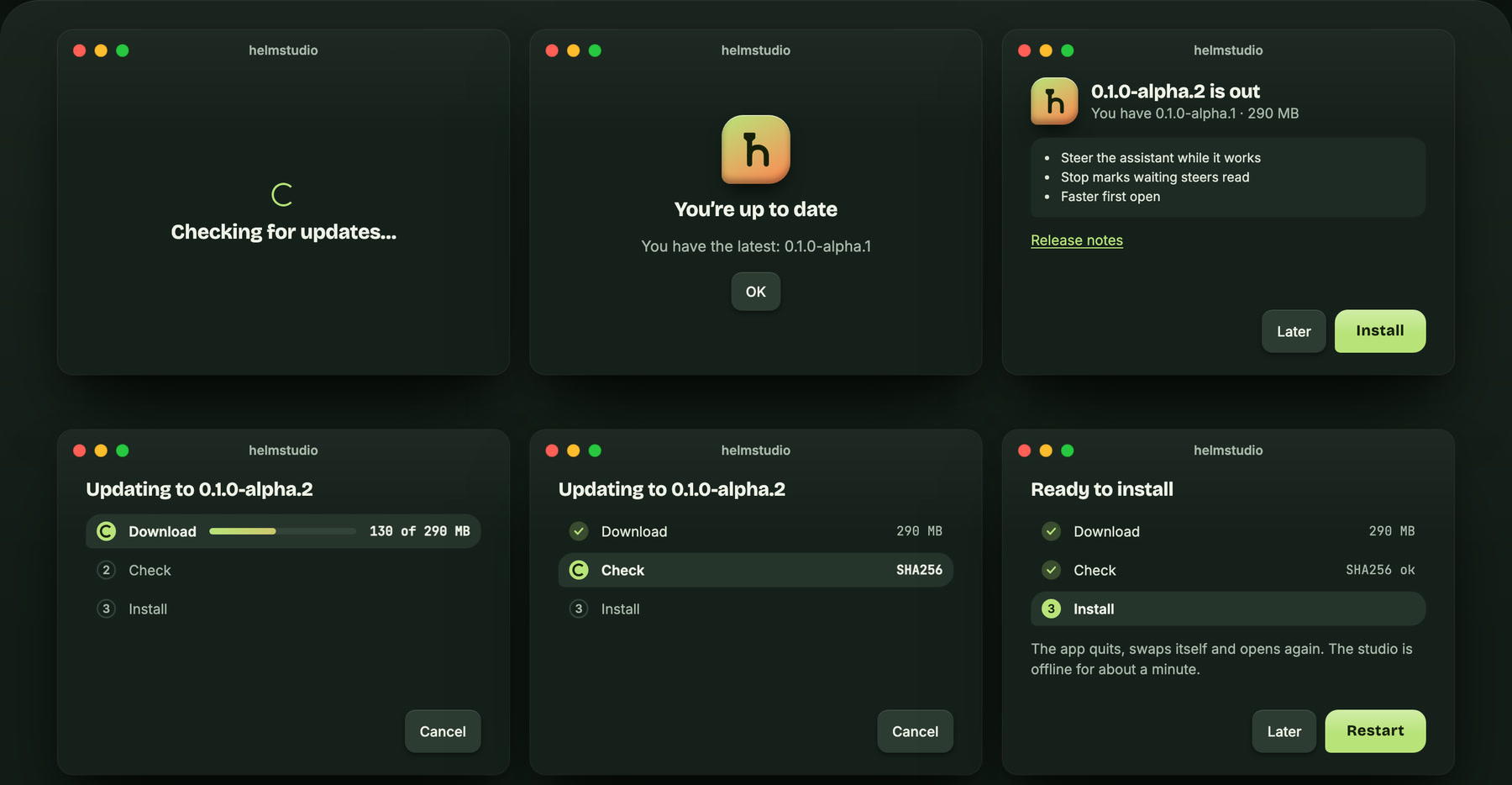
The app checks for a new release when it opens and every 24 hours. While it is an alpha, it offers pre-releases too. To check now, choose Check for updates… in the menu bar menu.
When a new version is out, a small window says so (for example 0.1.0-alpha.5 is out), with your version, the download size, what changed and a Release notes link. The menu shows Update to … and the menu bar icon gets a small blue dot.
-
Press Install. Nothing downloads before you do. Later closes the window; the menu keeps the update.
-
The window shows Updating to …: Download with its progress, then Check, which checks the download against the release’s SHA256 (SHA256 ok). Cancel stops the download and deletes it.
-
Ready to install: press Restart. The app quits, swaps itself and opens again. The studio is offline for about a minute.
The first open after an update shows Updating helmstudio: VM, Update the images (with a progress bar for the new images), Services, Runners (the new runner code and packages), then Remove old images, which says how much it freed. The old images are removed only once the new version runs; if a step fails, they stay and the next open tries again. Your takes, models and settings stay.
If something goes wrong, the window says so and nothing changes (“Nothing changed. You still have …”):
| Message | Means |
|---|---|
| Could not check for updates | GitHub could not be reached. Check the internet connection and press Try again. |
| Download failed | The download stopped. Check the internet connection and press Try again. |
| Check failed | The download does not match its SHA256. It was deleted. Try again downloads it again. |
| Cannot install here | The app runs from a place it cannot change, such as the .dmg itself. Drag it to Applications, open it from there, then update. |
The menu bar
Section titled “The menu bar”The helmstudio icon in the menu bar has a status dot: green is Ready, yellow is Starting…, red is Something is down. Its menu:
| Item | What it does |
|---|---|
| Update to … | Shown when an update waits, with a blue dot. Opens the update window. While it downloads it reads Updating… N%. |
| Open | Shows the studio window |
| Restart runners | Restarts the model runners, after a runner stalls or a new model is added |
| Open logs | The app’s log and one log per runner |
| Keep running | On by default. Closing the window or Cmd+Q only hides the app; the studio keeps running. |
| Open at login | Off by default |
| Check for updates… | Checks for a new version now |
| Quit | Stops the runners, the services and the VM (about 25 seconds). Your takes and data stay. |
Plugins
Section titled “Plugins”The app ships the built-in plugins: Web search and the
skills. A plugin that starts itself, such as Web search, is started by the app’s runners while it
is on, and starts again each time you open the app. Your own plugins go in ~/.helm/plugins/.
Remote models
Section titled “Remote models”Remote model providers are on in the app. In Hub › Providers, pick a provider and paste its key. Remote providers only power text jobs, such as the Assistant and pipeline agents. To use your own Claude plan instead of a key, see Your Claude subscription.
Use it from Claude
Section titled “Use it from Claude”helm ships inside the app. Sign in once (it asks for the admin password), then add it to Claude Code:
/Applications/helmstudio.app/Contents/Resources/bin/helm login --url http://127.0.0.1:8310 --email <admin email> \ --api-key-file ~/Library/Application\ Support/helmstudio/stack/deploy/secrets/helm_api_keyclaude mcp add -s user helmstudio -- /Applications/helmstudio.app/Contents/Resources/bin/helm mcphelm keeps one address, so signing in to the app replaces a sign-in to another stack. More in
Use helmstudio from Claude.
Build it yourself
Section titled “Build it yourself”From the repository, make -C desktop app builds desktop/dist.noindex/helmstudio.app, and make -C desktop dmg
packs it as a disk image. The build uses the released images.
Where things are
Section titled “Where things are”| Folder | Holds |
|---|---|
~/Library/Application Support/helmstudio |
Settings, logs, secrets, downloaded updates and the runners’ Python |
~/.helmstudio-vm |
The VM. Its disks hold the images and your data. |
~/.helm |
Your plugins (plugins/) and the logs of plugins that start themselves (logs/) |
Deleting the app leaves these folders. To remove everything, quit the app, then delete them.